# JavaScript Modules Demystified: package.json, tsconfig, and How They Fit Together
Table of Contents
You open a new typescript project and see three config files, all mentioning “module” in some form:
package.jsonhas"type": "module"
{ "type": "module", ...}tsconfig.jsonhas both"target"and"module"
{ "compilerOptions": { "target": "ES2020", "module": "esnext", ... }}They sound like they do the same thing, but they don’t.
This post untangles the confusion. By the end, you’ll know exactly what each setting controls, how they relate to each other, and how to configure them correctly for any project.
TL;DR
"target"intsconfig.json: Controls JS syntax level (arrow functions, async, etc.). This sets the lowest JS version to target. Modern JS syntax will be downleveled accordingly (not polyfills)."module"intsconfig.json: Controls the import/export syntax (importvsrequire)."type": "module"inpackage.json: Controls how Node.js reads the emitted.jsfiles (treat them as ESM or CJS)
A Brief History
Before we dig in, some context. Node.js originally shipped with CommonJS (CJS) as its module system.
You would write require() to import and module.exports to export. It worked, but it was Node-specific.
const crypto = require('crypto')
const randomNumber = (max) => crypto.randomInt(max)module.exports = randomNumber
Then the JavaScript language itself got a standard module system: ECMAScript Modules (ESM).
This is the import/export syntax you see everywhere today.
The problem? Node needed a way to tell .js files apart, since the same .js extension could mean either system.
import crypto from 'crypto'
const randomNumber = (max) => crypto.randomInt(max)export default randomNumber
That’s where our three settings come in.
"type": "module" in package.json
This one is the simplest, and the most misunderstood.
The "type" field in package.json tells Node’s runtime how to interpret .js files in your project.
It’s a Node.js runtime concern, though TypeScript’s module nodenext mode also reads it.
Without "type": "module"
By default (or with "type": "commonjs"), Node treats every .js file as CommonJS:
// This worksconst add = (a, b) => a + bmodule.exports = { add }const { add } = require('./math.js')console.log(add(1, 2))With "type": "module"
When you add "type": "module" to your package.json, Node treats every .js file as ESM:
export const add = (a, b) => a + bimport { add } from './math.js'console.log(add(1, 2))What if you need to mix ESM and CJS?
Node provides two special file extensions:
.mjsfiles are always treated as ESM, regardless of the"type"field.cjsfiles are always treated as CJS, regardless of the"type"field
target in tsconfig.json
Now we move to TypeScript territory. The "target" setting in tsconfig.json controls what JavaScript syntax TypeScript emits when it compiles your .ts files.
This is purely about syntax downleveling. If your target environment doesn’t support arrow functions, TypeScript rewrites them as regular functions. If it doesn’t support async/await, TypeScript rewrites those too.
Example
Given this TypeScript input:
const greet = async (name: string) => { const message = `Hello, ${name}!` return message}With "target": "ES5", TypeScript emits:
var greet = function (name) { return __awaiter(this, void 0, void 0, function () { var message return __generator(this, function (_a) { message = 'Hello, ' + name + '!' return [2, message] }) })}With "target": "ES2022", TypeScript emits:
const greet = async (name) => { const message = `Hello, ${name}!` return message}The logic is identical. Only the syntax differs.
What Each Target Enables
| Target | Notable Syntax Features |
|---|---|
| ES5 | No arrow functions, no const/let, no template literals |
| ES2015 | Arrow functions, const/let, classes, template literals, destructuring |
| ES2017 | async/await |
| ES2020 | Optional chaining (?.), nullish coalescing (??) |
| ES2022 | Top-level await, class fields |
| ESNext | Latest features (moves forward with each TypeScript release) |
Common Misconception
target does NOT control import/export syntax. It will not convert your import statements to require() calls, or vice versa. That’s the job of the module setting.
module in tsconfig.json
This is the setting that actually controls module syntax in TypeScript’s output. Specifically, it determines what kind of import/export statements appear in the emitted JavaScript.
Same Input, Different Output
Given this TypeScript file:
export const add = (a: number, b: number) => a + bWith "module": "commonjs":
'use strict'Object.defineProperty(exports, '__esModule', { value: true })exports.add = void 0const add = (a, b) => a + bexports.add = addWith "module": "esnext":
export const add = (a, b) => a + bThe first emits require()-compatible CJS code. The second preserves the ESM export syntax.
Common Values
| Value | Emits | Use Case |
|---|---|---|
"commonjs" | require() / module.exports | Traditional Node.js apps |
"esnext" | import / export | Projects using a bundler (Vite, webpack, esbuild) |
"nodenext" | import or require() depending on context | Modern Node.js (respects package.json "type") |
"preserve" | Keeps original syntax unchanged | When another tool handles module transformation |
nodenext: The Smart Choice for Node.js
"module": "nodenext" is special. Instead of always emitting one format, it reads your package.json "type" field and emits the appropriate syntax:
- If
"type": "module"is set,.tsfiles compile to ESM - If
"type"is absent or"commonjs",.tsfiles compile to CJS .mtsfiles always compile to ESM,.ctsfiles always compile to CJS
This mirrors exactly how Node itself decides, which means your TypeScript output and Node’s runtime expectations will always be in sync.
A Note on moduleResolution
You’ll often see "moduleResolution" alongside "module". While "module" controls what syntax is emitted, "moduleResolution" controls how TypeScript finds the files you import.
For instance,
import customModule from './customModule'"moduleResolution" answers the question of where to find './customModule' file.
Dive deeper into "moduleResolution" at the official docs.
How They All Relate
Here’s the full picture of how these three settings work together:
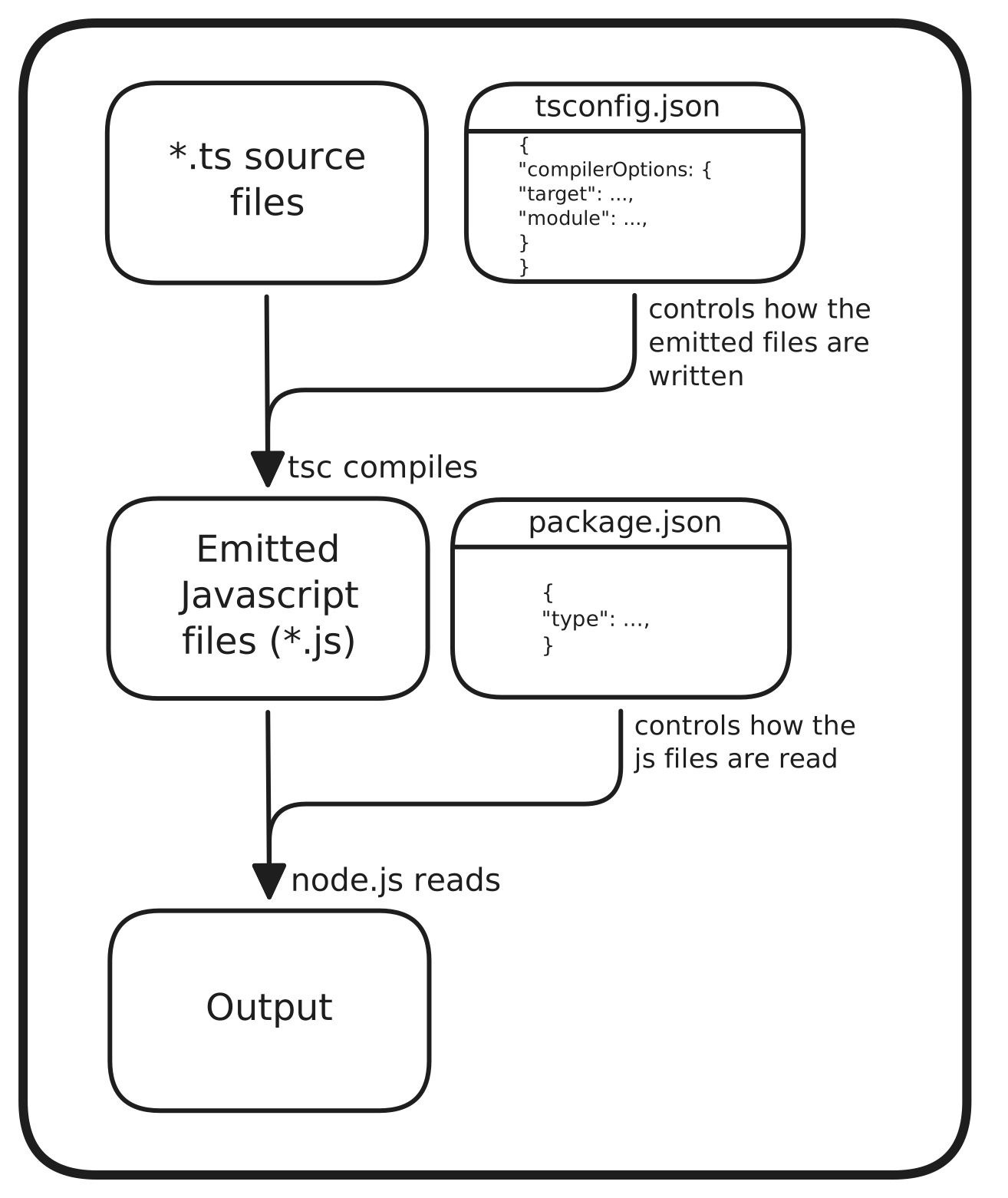
TypeScript controls what gets written. package.json controls how Node reads it. They must agree.
If TypeScript emits import statements (because "module": "esnext") but your package.json doesn’t have "type": "module", Node will try to parse ESM syntax as CommonJS. You’ll get the dreaded error:
SyntaxError: Cannot use import statement outside a moduleThe fix is always the same: make sure the module format TypeScript emits matches what Node expects to read.
Real-World Example Configs
Let’s look at three common setups and how their configs align.
1. Pure ESM Node.js Library
For a modern library that ships ESM:
{ "name": "my-esm-library", "type": "module", "exports": "./dist/index.js"}{ "compilerOptions": { "target": "ES2022", "module": "nodenext", "moduleResolution": "nodenext", "outDir": "dist", "declaration": true }}Why this works: "module": "nodenext" sees "type": "module" in package.json and emits ESM.
Node sees "type": "module" and parses the output as ESM. Everything agrees.
2. CJS Node.js Application
For a traditional CommonJS app (still very common):
{ "name": "my-cjs-app", "main": "dist/index.js"}{ "compilerOptions": { "target": "ES2020", "module": "commonjs", "moduleResolution": "node", "outDir": "dist" }}Why this works: No "type" field means Node defaults to CJS. "module": "commonjs" tells TypeScript to emit require() calls. Both sides expect CJS.
3. Frontend App (Vite/bundler)
For a frontend app where a bundler handles module resolution:
{ "name": "my-frontend-app", "type": "module"}{ "compilerOptions": { "target": "ES2020", "module": "esnext", "moduleResolution": "bundler", "jsx": "react-jsx" }}Why this works: The bundler (Vite, webpack, esbuild) consumes the TypeScript output, not Node directly. "module": "esnext" emits clean ESM that bundlers understand natively. "moduleResolution": "bundler" tells TypeScript to resolve imports the way bundlers do (allowing extensionless imports, package.json "exports", etc.).
Related tsconfig options
These are some related tsconfig options worth exploring further, as they relate to "target" and "module" that have been discussed here:
"lib": provides type definitions for built-in JS APIs (like Math). Its default is set by"target"."verbatimModuleSyntax""esModuleInterop"
Common Pitfalls
Before wrapping up, here are mistakes that catch people repeatedly:
1. ESM output without "type": "module"
You set "module": "esnext" in tsconfig.json but forget to add "type": "module" to package.json. TypeScript happily emits import statements, but Node chokes on them.
2. Confusing target with module
Setting "target": "ES2022" and expecting import statements to appear. target only controls js syntax like arrow functions and optional chaining. Module syntax is controlled by module.
3. Using "module": "esnext" for Node.js
"esnext" is designed for bundlers. For Node.js, use "nodenext" instead. It respects your package.json and handles the .mjs/.cjs edge cases correctly.
4. Mismatched module and moduleResolution
Using "module": "nodenext" with "moduleResolution": "node" (the old resolver) is a compile error — TypeScript enforces that "nodenext" uses "moduleResolution": "nodenext". Similarly, pair "esnext" with "moduleResolution": "bundler".
Resources
Here are some more in-depth references:
- Node.js Modules Documentation covers how Node decides between ESM and CJS
- TypeScript
moduleReference is the definitive guide to themoduleandmoduleResolutionoptions - TypeScript
tsconfigReference for all compiler options includingtarget